Royal Arrow: Merge & Match
- 4.3
- Rating
- 100.00K
- Installs
- Free
- Price

 Analysis by App-foxy
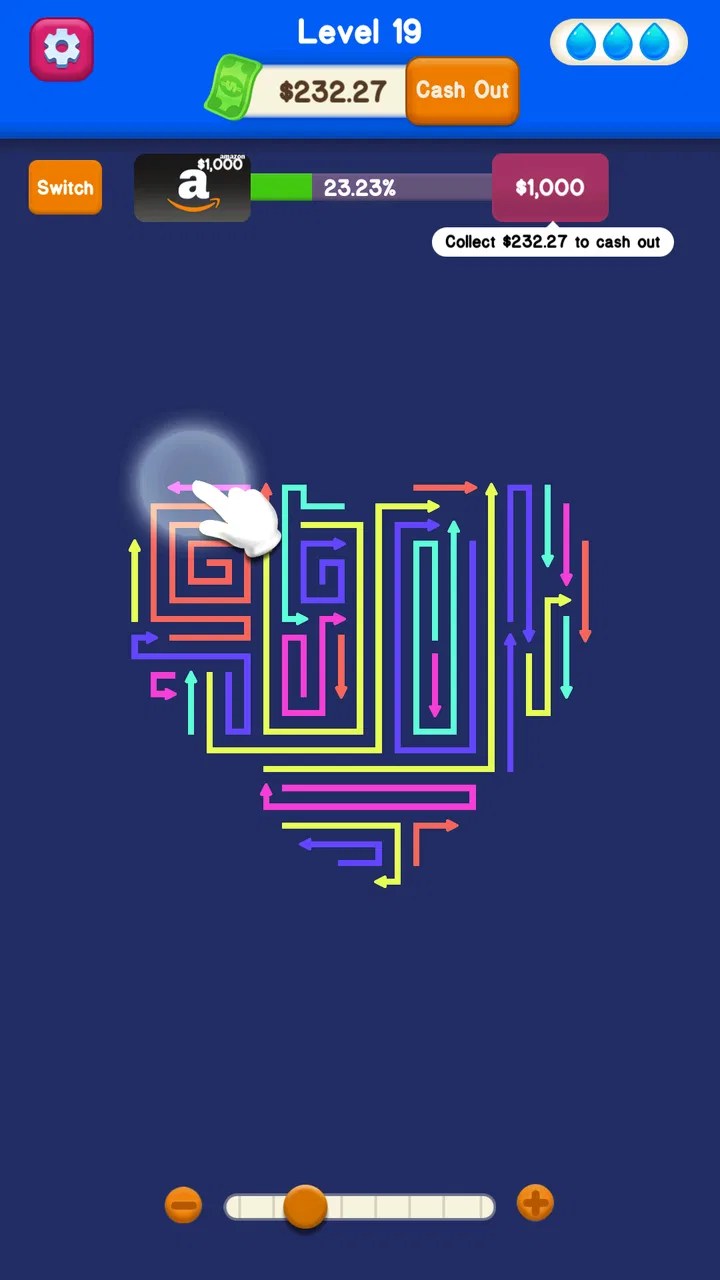
I spent time with Royal Arrow: Merge & Match as a light puzzle game, paying particular attention to how comfortably it can be read, tapped, and played in different everyday situations. Its central idea is easy to understand: arrange matching arrows and merge them while working through a calm, casual puzzle experience. That simplicity is the main attraction, but it also means the game depends heavily on clear visual feedback and comfortable touch control.
What I like most is that it does not ask me to learn a complicated rule set before I can begin. I can open it, look at the board, and start considering the available arrows almost immediately. The game is free, works on Android devices running version 6.0 or later, and is rated for Everyone 10+, so it is positioned as an approachable choice rather than a specialist puzzle title. The developer is Харитония Илиева, and the current release is version 1.0.2.
How clearly the board communicates its puzzles
I find the board’s arrows easiest to read when I pause to scan their direction and position before tapping; that small habit turns a quick glance into a more considered move. In this section, I’ll look at how the puzzle’s visual language supports that process and where careful reading matters most. Clear recognition is part of the challenge, not just decoration, and it shapes how comfortably the game fits into a short break.
You May Also Like

 AccuWeather: Weather Radar
AccuWeather Review: A Quick, Clear Forecast for Everyday Decisions
For everyday plans, the best forecast is the one you can understand quickly. AccuWeather makes rain timing, radar, and local conditions easy to act on, with a few trade-offs.

 Hill Climb Racing
Why Hill Climb Racing Still Turns Crashes Into One More Run
A tiny car, a bumpy hill and one more upgrade: Hill Climb Racing keeps resurfacing because its simple chaos makes every near-miss feel personal.

 AliExpress - Shopping App
AliExpress Makes Global Shopping Feel Personal, but Shoppers Bear the Risk
AliExpress turns a global marketplace into a pocket-sized discovery engine. Its reach is useful, its shopping loop compelling, and its trade-offs easy to miss.

 Lords Mobile: Kingdom Wars
Lords Mobile Is a Kingdom-Building Routine, Not a Quick Match
A case-by-case verdict on the building, battles, device demands, and social commitments that make Lords Mobile rewarding for some players and exhausting for others.

 PDF Scanner app - TapScanner
TapScanner Makes Paperwork Easier to Capture, Check, and Share
TapScanner makes scanning with a phone feel less like a rescue operation and more like a dependable step in getting work done. Its capture tools are useful, though not flawless.

 Block Blast!
Block Blast! Shows How Much a Puzzle Game Can Leave Out
A quiet grid game shows why puzzle players increasingly value instant clarity, repeatable skill and low-pressure play—and where the genre still needs to catch up.
More From Our News Desk
View All News


Readability and navigation
The visual language of an arrow-matching puzzle has an advantage over many abstract logic games: direction gives every piece an immediate identity. I do not have to remember a collection of symbols or decode a long list of icons. I can scan the board for arrows that appear to belong together, then think about how a merge might affect the remaining space. That makes the first few moments of a session feel welcoming, especially when I am tired or only want something small to occupy my attention.
The most important reading task is not simply spotting an arrow. It is understanding its direction, position, and relationship to nearby pieces. I found that I naturally slowed down before making a move, checking whether a match would open a useful route or create a less convenient arrangement. This gives the game more thoughtfulness than a purely reflex-based casual title, while keeping the mental workload lower than a large strategy or word puzzle.
Navigation benefits from the focused nature of the play area. There is no need to move through a large map or manage a complicated collection of menus to reach the main activity. That matters for players who prefer a direct interface, including anyone who finds busy game hubs distracting. A short session can remain centered on the puzzle rather than on settings, inventory screens, or layered progression systems.
At the same time, arrow puzzles can become visually demanding when several directions and possible matches are visible at once. The board may be simple in concept, but a crowded arrangement still requires careful scanning. My practical advice is to avoid making the first available match automatically. I look across the whole board first, identify the pairs that could influence the most space, and only then commit to a move. This habit reduces unnecessary visual backtracking and makes the game feel more deliberate.
For someone who has difficulty distinguishing small directional changes, the game’s readability will depend on the device display and the surrounding visual contrast. I would play on a screen that gives the board enough room and avoid shrinking the game into a small window. Larger text elsewhere in the system may help with menus, but it cannot change the size or design of the puzzle pieces themselves. That is an important distinction: a phone’s general display settings may improve some interface elements without making every arrow equally easy to interpret.
Motor and sensory considerations
The control style suits me when I want a game that does not demand rapid reactions. Matching and merging arrows is primarily a matter of selecting the right piece at the right time, not maintaining a long sequence of fast taps. That makes it more comfortable than action-oriented casual games for players who prefer a slower pace or need extra time to plan each movement.
There is also a useful difference between low pressure and no pressure. Even in a relaxing puzzle, a poorly chosen tap can change the board in a way I did not intend. I therefore use a light, controlled touch and pause briefly after each action to confirm what has changed. This is a small workflow, but it helps when finger precision is inconsistent or when I am playing with one hand while standing on public transport.
One of the game’s strongest situational qualities is its suitability for offline play. I can treat it as a compact mental break without needing to plan around a connection. That is useful on a flight, in a waiting room with unreliable service, or during a commute through areas where mobile data is inconsistent. Offline access does not make the game universally accessible, but it removes one common obstacle from casual play.
The sensory profile is calmer than that of games built around constant explosions, rapid camera movement, or loud competitive feedback. The basic act of examining arrows and making a merge gives me a more settled experience. Still, “relaxing” should not be confused with guaranteed comfort for every player. Visual concentration can become tiring, particularly during a long session, and anyone sensitive to repeated screen focus should take breaks rather than treating the game as effortless.
A useful approach is to play in short rounds with the phone held steadily at a comfortable distance. I avoid playing while walking, not because the game requires fast reactions, but because divided attention makes careful board reading harder and increases the chance of an accidental tap. The game works best when I give it a small, defined pocket of attention instead of trying to operate it as background entertainment.
Situational access in ordinary routines
I see the clearest use case during small gaps in the day. If I have several minutes before an appointment, I can begin a puzzle without committing to a long story sequence or a competitive match. If I am waiting for food or taking a quiet break from work, the arrow board gives me something structured to focus on. The game’s casual format is particularly suitable for people who want a little problem-solving rather than an endless stream of passive scrolling.
It also fits players who share a device occasionally. A person can hand over the phone and explain the basic objective quickly: look for matching arrows, decide how they fit, and merge them. That low explanation cost is valuable in a family setting, although the Everyone 10+ rating is the appropriate guide for the intended age range. I would not present it as a learning app or assume that every younger child will find the visual planning equally easy.
For older players or anyone returning to mobile puzzles after a long break, the straightforward premise is a genuine advantage. There is less pressure to understand a large fictional world, memorize complex controls, or keep up with other players. The main challenge is visual organization, so the game can feel approachable without being completely mindless.
For players who use one hand, the experience may be manageable during brief sessions, but I would still recommend using both hands when the board requires more careful inspection. One hand can stabilize the device while the other selects pieces, reducing the chance of a slip. This is especially helpful on larger phones, where reaching across the screen can make a precise tap less comfortable.
The offline format also changes how I judge its value. I do not need to reserve it for a place with strong reception, and I can use it when I want to limit interruptions from online activity. That makes it a better fit than many live puzzle alternatives for someone who wants a self-contained break. On the other hand, a player who enjoys social competition, shared events, or constantly changing online challenges may find this style too solitary.
Where the experience still creates barriers
The biggest limitation is that the game’s core communication is visual. Arrows must be recognized by their direction and placement, and matching depends on reading those visual relationships. Players with low vision, color-vision differences, or difficulty processing dense arrangements may need a larger display and stronger personal adjustments to use it comfortably. I would not assume that a calm presentation automatically makes the game accessible to every visual profile.
Motor access can also vary from person to person. The game is gentler than a fast arcade title, but it still expects accurate interaction with individual board elements. Someone with tremors, limited reach, or difficulty maintaining a steady touch may find that a relaxed pace does not fully solve the control problem. The absence of a time rush helps, yet precision remains part of the task.
Another barrier is cognitive fatigue. The rules are simple, but planning several moves ahead can become demanding when the board contains many possible matches. I find that the game is most comfortable when I stop before the puzzle turns into visual clutter. A player who wants a completely passive relaxation tool may be disappointed, because the experience still asks for sustained attention and decision-making.
There is also a trade-off between simplicity and depth. Compared with a traditional match-three game, Royal Arrow places more emphasis on direction and arrangement than on quickly swapping colorful objects. Compared with a number puzzle, it is more visual and spatial, with less dependence on arithmetic or word knowledge. Those differences help define its audience: I would choose it for directional planning and quiet board reading, not for social play, story, or a broad variety of puzzle genres.
Players who need extensive customization should approach it with realistic expectations. A simple casual game can be easier to understand than a feature-heavy alternative, but it may offer fewer ways to adapt the presentation or controls to individual needs. If a player depends on specialized visual, touch, or audio support, I would test the game briefly on the intended device before making it a regular part of a routine.
What the reception suggests, and what it does not decide
The game has reached over 100 thousand installs and holds an average rating of 4.2 from around 2.9 thousand ratings, with roughly 813 written reviews. Those figures suggest that the basic concept is connecting with a meaningful group of casual puzzle players. I read that as encouragement to try it, not as proof that every player will find the controls or visual presentation comfortable.
Because it is free, the cost of testing it is low in practical terms. That makes a short personal trial worthwhile, especially for anyone deciding whether arrow-based matching feels clearer than the usual colored-tile format. I would use the first session to judge three things: whether the arrows remain distinct on the device, whether individual taps feel dependable, and whether the planning pace feels calming rather than tiring.
The age rating of Everyone 10+ also gives the game a defined general audience, but it should not be treated as an accessibility guarantee. Age suitability and ability support are different questions. A player can be within the intended age range and still need a different puzzle design because of visual processing, touch accuracy, or concentration needs.
How it compares with familiar casual puzzle choices
Many casual mobile puzzles rely on colorful matching, timed rounds, or a steady stream of rewards. This game stands apart through the arrow theme and the emphasis on arranging directional pieces. I prefer that when I want to think before tapping. A conventional match-three game is probably better for someone who enjoys quick combinations and immediate visual bursts, while a word game may be a better choice for a player who finds directional symbols difficult to distinguish.
It also occupies a middle ground between a pure relaxation toy and a demanding logic challenge. The offline design and uncomplicated premise make it easier to pick up than a large strategy title, but the need to inspect the board means it is not simply something I can play without looking. That balance is its identity. I can use it to reset my attention, but I still need to participate actively.
For accessibility-conscious players, the comparison should focus on the kind of information each game asks them to process. Royal Arrow uses direction, spacing, and touch selection. A number puzzle uses symbols and quantities. A word puzzle uses text and language. None is automatically superior for every player. I would choose this one when arrows are an intuitive visual language for me and avoid it when text, audio guidance, or stronger contrast options are essential to comfortable play.
Who I would recommend it to
I would recommend this game to someone who enjoys quiet, self-contained puzzles and likes the satisfaction of making a board more orderly. It suits short breaks, offline situations, and players who prefer planning over reflexes. It is also a good candidate for people who find large mobile games overwhelming and want a focused activity that can be understood without a long tutorial.
I would be more cautious about recommending it to players seeking a deep progression system, multiplayer interaction, or a constantly changing challenge structure. It is not the right substitute for a competitive puzzle platform or a story-driven adventure. I would also suggest trying another category first if arrow direction is visually tiring or if precise touch selection is difficult.
My best practical tip is to treat each board as a planning exercise rather than a race. Scan for the match that will leave the most useful space, make one deliberate move, and reassess instead of tapping through every obvious pair. That approach makes the game more satisfying and can reduce unnecessary mistakes. It also gives players who need a slower tempo a clearer way to participate.
An inclusive verdict on the experience
Royal Arrow: Merge & Match is a focused casual puzzle with a clear visual premise, a gentle pace, and the useful freedom of offline play. I found it easiest to enjoy when I wanted a short break that still engaged my attention. The arrow-based design gives it a distinct feel compared with ordinary tile-matching games, while the straightforward structure keeps the learning curve approachable.
Its inclusive qualities are strongest in its low-pressure format, direct objective, and suitability for interrupted routines. Its remaining barriers come from the same place as its identity: the player must visually interpret arrows and tap individual pieces accurately. That makes device size, personal visual comfort, and touch control important parts of the decision.
With a 4.2 average and more than 100 thousand installs, it has enough player interest to merit a fair trial, and being free makes that trial easy to justify. My recommendation is positive but specific: choose it if you want an offline directional puzzle that rewards careful observation, and skip it in favor of a word, number, or more customizable game if those formats better match the way you read and interact with a screen. The best reason to try it is its calm, deliberate use of arrows; the main reason to hesitate is that visual clarity and touch precision remain central to every move.
FAQs for Royal Arrow: Merge & Match
01What is Royal Arrow: Merge & Match, and how is the gameplay structured?
Royal Arrow: Merge & Match is a casual puzzle game built around combining matching arrow pieces and completing increasingly challenging board objectives. During play, you generally merge or match items to create stronger pieces, clear space, and progress through levels. The formula is easy to understand at first, but later stages usually require more deliberate moves, planning, and efficient use of the available board.
02Is Royal Arrow: Merge & Match free to download and play?
The game can generally be downloaded and played without an initial purchase, making it accessible to casual players who want a short puzzle experience. However, free-to-play games commonly include optional advertisements, bonus offers, or in-app purchases for extra resources, boosters, or faster progression. Before downloading, check the store listing and your device’s purchase settings, especially if children may use the device.
03Can I play Royal Arrow: Merge & Match without an internet connection?
Some puzzle levels may be available offline, which is useful when traveling or when you have limited mobile data. Nevertheless, features such as advertisements, cloud synchronization, events, leaderboards, rewards, or account-related services may require an internet connection. Because offline availability can change between versions, it is best to test the game after installation rather than assuming every mode and reward will work without connectivity.
04Does Royal Arrow: Merge & Match contain advertisements or in-app purchases?
Players should expect the possibility of advertising and optional purchases, as these are common monetization methods in free mobile puzzle games. Ads may appear between levels or be offered in exchange for additional moves, coins, or boosters. Purchases can sometimes accelerate progress but are not normally essential to understand the basic gameplay. Review the payment information in the official app store before confirming any transaction.
05Is Royal Arrow: Merge & Match suitable for children and casual players?
The simple matching and merging concept makes Royal Arrow: Merge & Match approachable for casual players and people who prefer relaxed, easy-to-learn games. Difficulty can increase as levels progress, so younger players may occasionally need help with strategic stages. Parents should also review the game’s age rating, advertising, privacy details, and purchase controls, since the exact content and monetization features may vary by platform and region.
Pros
- Simple merge mechanics make the game easy to learn.
- Short levels fit well into quick gaming sessions.
- Combining arrows gives a satisfying sense of progression.
- Bright visuals make the board easy to read.
- Casual gameplay works well for players of different ages.
Cons
- Later stages can feel repetitive without much mechanical variety.
- Progress may slow when upgrades become more expensive.
- Some players may find the frequent ads disruptive.
- Limited strategic depth may reduce long-term appeal.
- An internet connection may be required for certain features.

Royal Arrow: Merge & Match
Gallery